HEAD TO THE MOUNTAINS: WINTER VS SUMMER

The picturesque alpine resorts high above sea level, nestled in the stunning mountain ranges of Europe, aren’t just a skier’s Mecca.

Sweet Lie or Bitter Truth

If you're given a chance to choose in a situation which involves knowing a lie and truth, would you be happy to hear the sweetness of a lie or choose to get hurt as long as you're hearing the truth?

Transient Ischemic Attack (TIA) a.k.a Traitor In Action

TIA or Transient Ischemic Attack is a sudden onset of a focal neurologic symptom and/or sign lasting less than 24 hours.

When You Played The Music

Your music is very nice, very nice. However, I don't know when will it stay nice.I don't know when will it stay as a music to my ears.

Zabadani Cafe In Layers and More

Zabadani Cafe offers Layered Coffee, Soda and Milk Tea and whole lot more. Great place, great food.

Showing posts with label Tech. Show all posts

Friday, September 14, 2012

Importance of Computer Literacy

We are now living in the digital age and knowing how to use the computer is already a necessity. Almost every transaction is being done using a computer that even schools are using the device to teach their lessons.

Computers were basically invented to compute thus the name. However, over the period of time, computer also evolved into something awesome and can already perform logical tasks and a lot more complex things. Partnered with an internet connection, almost all questions in the world can already be answered by a computer.

 That’s why, it is very important to know to how to use one. Basic computer programs are being taught in school and are being offered as a short course program for those who are no longer in their school age years. It aims to teach the basic knowledge on how to utilize a computer properly and appropriately.

For a household having their own computer at home, learning how to use it won’t be that difficult. Most of the young people in the family or the children can teach their parents or anyone who didn’t have the chance to learn it during their younger years. Good thing computer classes are already included in today’s curriculum ensuring that the latest generation of students are already computer literate.

If no one in the family can teach it, then better enroll yourself in one of the best computer schools to keep up with the fast paced world. It not too late to start after all.
-niceurdaneta-

Wednesday, May 30, 2012

How To Unlock Your USB Modem

The wait is finally over folks as here is the step by step process on how I had my usb modem unlocked.I think I already mentioned in my previous post how convenient it is to have the unlocked one. Now before you read any further, bear in mind that is going to be a 'try-at-your-own-risk' process. The entire thing worked pretty well on my usb modem and I'm hoping that it would also work fine on yours. I'm just sharing here what I exactly did. You might be hesitant right now because maybe you think you're not that techy enough to pull through but I tell you this, 'We Are On The Same Boat', I'm not that techy either. I'm just a curious, determined and stingy person who doesn't want to pay anyone to do things for me if I can do it on my own. For everyone's convenience, I'd be posting screen shots for proper guidance. 


Here are the basic things that we need before we proceed: 


1. Your USB Modem. 
As to my case I have this white Huawei HSDPA USB Stick. 
Model: E1553 (I think this info is written in your stick, just look for it) 
IMEI No: 354112032341500 


You would be needing these information later on. 


2. Software/s 


v4mpire-unlocker.rar 


I downloaded mine over 4shared.com. I think you will needing an account in 4shared to do this. Don't worry, 4shared is one of the legit downloading sites in the internet. It is one of the places to look whenever you need anything. It is a rar file so make sure you have winzip or 7-zip to extract the file.


In there you will find two softwares. 
a. v4mpire.exe 
b. CargarCodigoUnlock.exe 


UNLOCKING Process 


1. To start the unlocking process, make sure you plugged in your USB modem. Do not connect the internet yet. 


2. Run 'CargarCodigoUnlock.exe' and click 'Please Select Com Port'. By this time, the software should have detected your usb modem, if not, pull it off then reconnect then try again. If it's already there, click 'Accept' then 'Unlock Modem' 


3. Then it would ask for a 'Modem Code' 


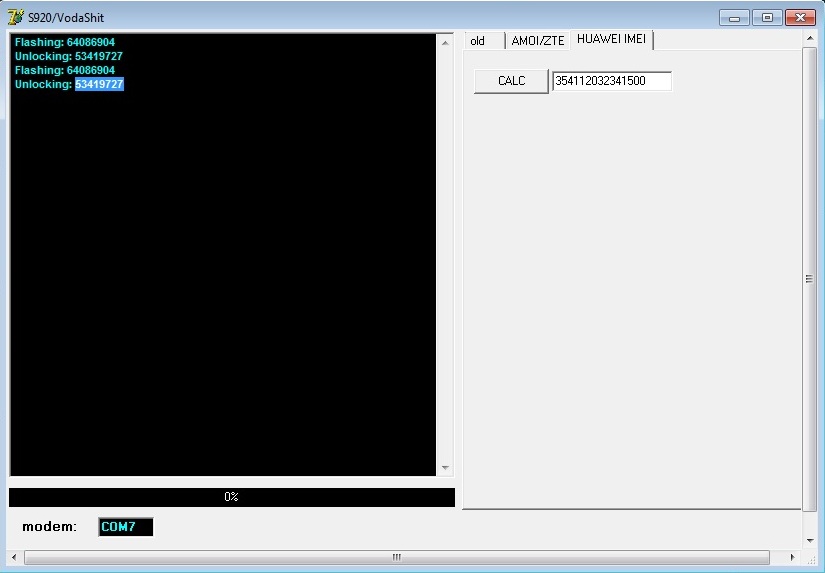
4. This time run 'v4mpire.exe'


5. Click Hauwei IMEI and enter your usb's IMEI then click 'CALC" 


6. On the black window on the left, it would display the 'Unlocking Code'. Copy then paste it to the 'Modem Code' being asked in step #3. 


7. Then click 'Unlock Modem'. You would be able to read in the white window that your USB is now unlocked. Yey! I hope you're going to be successful. Good Luck! 


Now for your dashboard configuration, here are the important information that you need to key in before you can successfully connect in the internet. Make sure also that you have enough credits/load.


Dashboard > Tools > Options > Profile Management 


SMART 
APN: Static 
APN Name: 
Smartbro Access Number: *99# 


Globe 
APN: Static 
APN Name: http.globe.com.ph 
Access Number: *99***1# 


Sun Cellular 
APN: Static 
APN Name: wap 
Access Number: *99# 


-niceurdaneta-

Monday, May 28, 2012

I Had My USB Modem Unlocked

Internet connection has become one of the most important parts in the life of a blogger. Most of us see to it that we are online 24/7 so that we won't be missing anything or be one of the first to know whatever's happening in the internet world. May it be a cool gadget's release date, celebrity breakups or wedding proposals, travel promos, blog contests etc. 

In the case of travel bloggers, having a wired internet connection is really not an option. We prefer having those plug-it or usb modems that we can carry anywhere we go. 

Ever since I started my online career, I only rely on my usb/plug-it modem for my internet connection. Admittedly, it's not that fast compared to the wired ones but the speed is just enough for my online needs. At first I had a postpaid one but later on I realized that it's not worth it. Though I could save few hundreds of having a postpaid modem, there are days that I couldn't connect, simply because the network doesn't have a a strong data signal in a place that I'm at especially if I'm in the provinces. 

The mentioned situation made me think that it would be best to have the prepaid one and having the modem open-line. In a certain place, there would always have this 'stronger' network provider and most likely it would be the same network provider that could give you the strong internet connection or data signal. I had my postpaid plan cut and bought a prepaid internet sim instead. And since I strongly believe that USB modems can be openlined or unlock, I spent few hours googling the process. I'm stingy type of person so paying someone to do it for me is not my way. 

After viewing some youtube tutorials and downloading a couple of softwares, ola! my usb modem is now unlocked. Of course, I bought the other networks' internet sims to try it out. It simply worked and I'm just so happy. Now I have an unlocked/openline usb modem, I can have an internet connection wherever I go. I would simply ask someone from the place that I'm at on what's the strongest network and use the internet sim accordingly. 


If you're not well versed with techy/internet terms, the process of having the usb modem unlocked is quite difficult but if you're determined enough to do it, Google is always there to help. 

For the configuration in your dashboard, here are the important data that you need to key in. (After unlocking) 


Dashboard > Tools > Options > Profile Management 


SMART 
APN: Static 
APN Name: Smartbro Access Number: *99# 


Globe 
APN: Static 
APN Name: http.globe.com.ph 
Access Number: *99***1# 


Sun Cellular 
APN: Static 
APN Name: wap 
Access Number: *99# 


Modem Used: HUAWEI HSDPA USB Stick Model: E1553 

-niceurdaneta-

Thursday, October 6, 2011

Steve Jobs Now Rests In Peace

I'm certainly not an Apple fan but it's not an excuse of not knowing who's behind its phenomenal achievements, STEVE JOBS. He co-founded the company and introduced to the world several of today's most sought after gadgets.

Getting to know Apple products never came into my mind since my techy savvy friend gave me an iPod shuffle as a Christmas gift 3 years ago with my name engraved on it. That was the time that I came to know iTunes and started to google about Apple products. To be honest, my shuffle is the only Apple gadget that I have because no matter how fascinated I am to have a Macintosh computer or a MacBook , I just can't afford it. iPhone on the other hand would be great to have but I'm in a country wherein data charges are bit expensive, so I just can't utilize it fully.


When I entered news writing, I followed several social networking accounts of technology related sites and Steve Jobs is one of their most reported personalities and his announcements have been followed most of the time. He has become a figure in the world of technology and was even given a star in the Entrepreneur Walk of Fame.

Some even collected a number of his quotable quotes and my favorite is the following:


"Your work is going to fill a large part of your life, and the only way to be truly satisfied is to do what you believe is great work. And the only way to do great work is to love what you do," - Steve Jobs


I may not be an Apple product fan but I can say that I'm a Steve Jobs' fan. I was able to follow his works in the company and he amazed me when he gave up his position as CEO last August. His position in the company is not that easy to give up but he sincerely gave it up because he knew very well he is no longer effective with his health conditions. A man who knows when to stop is a man of great discipline. He spent his entire able-life producing wonderful things not for himself but for everyone to enjoy. He has influenced a lot of people in this world and he would truly be missed. To Steve Jobs--> May you rest in peace :) 


-niceurdaneta-

Saturday, September 3, 2011

Living The Life Of A Techy

Techy people often have their gadgets with them 24/7. They just can't resist a single hour without these things. A common gadget among these people is a computer, may it be a desktop, laptop or a notebook perhaps. They just differ in brands but nevertheless, this gadget is of great help to them. They would play their favorite games in here, edit their pictures, download their songs and movies and a whole lot more.

Techy people could bring out the computer's best potential in their techy life if it has an internet connection. If they don't stay at home with their dial-up, dsl or broadband connection, you often see them staying in hot spots (WiFi) areas like coffee shops and some restaurants just to be online. Being online allows a techy person to keep up with the latest trends in technology or anything new in this world depending on what interests them most. They can also shop their gadgets through online shopping which often give them great deals.

Another gadget that a techy person would probably have is a gaming console. Xbox, PlayStation and the like. I can't write something about it because I'm simply not into it. Then we have music players. I often see them having iPods in their pockets with headsets in their ears while facing their laptops. They are music lover techies.

Next up would be cameras. Digital Slr's are very popular nowadays and techies often use it to capture the beauty of their newly acquired gadgets, important moments and a lot more. You often see these photography-lover techies on every festivals, blogging events or simply outside taking pictures. They also have their own photo blogs where they showcase their best pictures taken.

Lastly, a techie would always have a fine cellphone. Smartphones are the most popular ones which allow these techies to be online wherever they go. With today's latest technology, these smartphones can already have those things mentioned above in one. It can be used for browsing the internet, take pictures play games and listen to music.

If you're a techy person and reading this, I bet you're smiling right now and at the back of your mind you're saying, "Definitely True!". I'm a true-blooded techy too. I have my mp3's headset in my ears right now playing my favorite music while I'm facing my laptop with 30 tabs opened in my browser. My smartphone is also attached in my laptop which is on the process of syncing my latest pictures taken from a street festival that I attended few weeks ago.

iPod Shuffle (3rd Gen), Smart Bro Modem and NEO Basic 1340N, Blackberry Bold 9700. If I have these things, then you can leave me alone. All I need is a fine camera. -niceurdaneta-

Saturday, May 7, 2011

Smart Communications Sent Out Refunds For The Outage


Prepaid users of the country's biggest telecommunications company Smart Communication has been ranting and flooding their social networking sites with complaints few days ago. They can't send sms or make calls even if they got load credits. Some users are also complaining that their load credits just disappeared despite not using them.


The official twitter account of the company @SmartCares did send replies for those complaining the problem  but didn't disclose the reason why. They are just acknowledging the present situation. The problem continued until yesterday.

One of my friends who happens to be a Smart user sent a group message saying that she was able to receive a free load from the company. She made mention that this is somewhat like a "refund" for all those load credits taken from her due to the perceived outage. She also sent to me the apology SMS sent by the company regarding the issue which says:

We regret any temporary service disruption that you may have been experiencing. Please accept the free load we have credited to your account. We appreciate your continued patronage

The load being sent varies from one user to another. However, the load being sent is just a percentage of the wasted load credits and not the exact amount. The amount ranges from Php 6.00 to Php 300.00 based on the several people that I've known to have received the so called "refund"

As what has been posted in an article in GMA News Online, Smart's Public Affairs Head Ramon Isberto sent an SMS to them that as of today (May 5, 2011), their systems have already normalized. However he didn't directly acknowledge the network's problem and to which area of their system was really affected.

"We still need to deal with the backlog. Our target is to fix everything in the next 24 hours," he added.

-niceurdaneta-

Saturday, July 17, 2010

My BlackBerry Bold 9700

To be honest, with the work that I have right now, I really can’t afford this phone but it was such a blessing that it has reached my hand in the most unexpected way.

Me and my friend had an agreement before that once I reached my 5,000th article in his websites, then I will have a prize. I didn’t notice the time and to be honest I don’t think I already reached it but he said I did so I got this phone as the prize. So unexpected! Is it? It was just right in time because I’m celebrating my birthday when it was given. To my friend, you are AWESOME!

Anyway, I just want to share a brief description of this phone. BlackBerry Bold 9700 (codenamed “Onyx”) is a high-end mobile phone data device (smartphone) developed by Research In Motion. It runs using Blackberry OS 5.0.0.405. Its length is 109 mm, width of 60 mm and thickness of 14.1 mm. It comes with an Optical Trackpad, 3.2 megapixel camera with auto-focus and LED flash and 480 x 360 pixel color Half VGA resolution display.

So much for the technical description! Well, all I can say is that this phone allows me to be online 24/7, update all my social networking sites such as Facebook, Twitter and Foursquare with ease (provided that you’ve activated your BIS). That is so cool! Supposedly the phone is a Blackberry Bold 9700 Executive Edition (Bold 9700 White) but then we encountered BIS activation problems on the unit so we decided to have it replaced with the black one.